

 Bonani DOSH, Dhaka - 1230, Bangladesh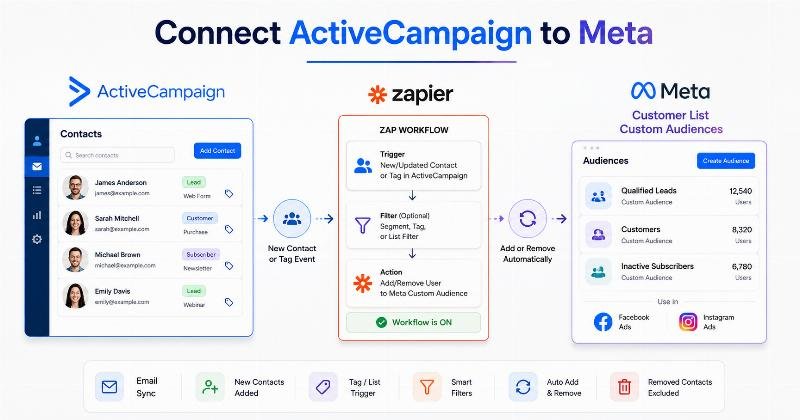

ActiveCampaign Custom Audiences by Zapier: Connect Contacts with Meta Ads
ActiveCampaign can tell a marketing team when a contact joins a list, receives a tag, updates a profile, completes an automation step or unsubscribes from a campaign. Meta advertising can use customer-list audiences to reach or exclude people who already have a relationship with a business. The operational challenge is moving the right contact into—or out of—the correct advertising audience when one of those events occurs.
Manually exporting contacts from ActiveCampaign and uploading spreadsheets to Meta can work for an occasional campaign. It becomes difficult when audience membership changes daily, multiple campaigns require different exclusions or several client accounts must be maintained.
ActiveCampaign Custom Audiences by Zapier is a trigger-and-action automation that can add an ActiveCampaign contact’s email address to a Meta Customer List Custom Audience, remove it when appropriate or create a new destination audience.
ActiveCampaign supplies the contact event. Zapier runs the automated workflow, commonly called a Zap. Meta receives the supported audience action and processes the customer-list update for use in eligible Facebook and Instagram campaigns.
This guide explains how the integration works, what its standard actions support, how to configure addition and removal workflows, which plans may be required, and how to manage privacy, testing, task usage and troubleshooting. It also compares Zapier with ActiveCampaign’s native Facebook Custom Audiences integration and manual customer-list uploading.
What Is ActiveCampaign Custom Audiences by Zapier?
ActiveCampaign Custom Audiences by Zapier is a third-party, no-code integration between ActiveCampaign and Zapier’s Facebook Custom Audiences application.
It follows a trigger-and-action structure:
- An event occurs in ActiveCampaign.
- Zapier detects that event.
- The Zap processes any configured filters or additional steps.
- Zapier performs an action in Facebook Custom Audiences.
A common example is:
Contact added to an ActiveCampaign list → Zapier runs → Contact email added to an existing Meta Custom Audience
The integration is intended for businesses that already manage contacts in ActiveCampaign and want certain changes to trigger Meta audience actions without repeatedly uploading CSV files.
Potential users include:
- Digital marketing teams
- Lead-generation agencies
- B2B businesses
- Ecommerce companies
- Membership and subscription businesses
- Course and event marketers
- Customer lifecycle teams
- Performance marketing specialists
This is not a complete audience-management platform on its own. ActiveCampaign remains responsible for contact information and lifecycle logic. Zapier controls the workflow. Meta controls customer matching, audience processing and advertising delivery.
The integration does not replace Meta Ads Manager, Meta Pixel, Conversions API, ActiveCampaign email automation or a complete customer-data governance programme.
About ActiveCampaign, Zapier and Meta Custom Audiences
What Is ActiveCampaign?
ActiveCampaign is a customer-experience and marketing-automation platform. Businesses use it to maintain contacts, lists, tags, fields, scores, campaigns, deals and automated customer journeys.
Information that may influence a Zap includes:
- A new contact being created
- An existing contact being updated
- A contact being added to a list
- A tag being added to or removed from a contact
- A campaign unsubscribe
- A campaign link click
- A webhook being sent from an automation
- A deal being created or updated
- A custom-object record changing
The exact triggers available can change as Zapier updates the ActiveCampaign application. Each trigger should be checked inside the current Zap editor before the workflow is planned.
What Is Zapier?
Zapier is an automation platform that connects applications through workflows called Zaps.
A Zap normally contains:
- A trigger that starts the workflow
- One or more actions that occur afterward
Paid plans can also support filters, paths, formatters, webhooks and multi-step workflows. These tools are useful when an ActiveCampaign event needs to be evaluated before a contact is sent to an advertising audience.
For example, a Zap may begin when an ActiveCampaign contact is updated, apply a filter requiring a specific lifecycle field and then add the email address to a Custom Audience.
What Are Meta Customer List Custom Audiences?
A Customer List Custom Audience is a Meta advertising audience built from advertiser-provided customer identifiers. Common examples include email addresses and phone numbers, although the standard Zapier actions discussed in this article currently focus on email addresses for individual additions and removals.
Meta attempts to match the submitted identifier with accounts across its technologies. Not every source contact will match.
A Customer List Custom Audience may be used, depending on current account and campaign availability, for activities such as:
- Retargeting existing leads
- Promoting related services to customers
- Excluding current customers from acquisition campaigns
- Re-engaging eligible inactive contacts
- Creating a source for a Lookalike Audience where available
Audience creation and campaign delivery are separate processes. Successfully adding an email to an audience does not guarantee that Meta will match the contact or deliver an advertisement to that person.
Role of Each Platform
| Platform | Primary Role | Example |
|---|---|---|
| ActiveCampaign | Stores contacts and generates lifecycle events | A customer tag is added to a contact |
| Zapier | Detects the event and runs the configured action | The Zap checks the tag and sends the contact email |
| Meta Custom Audiences | Processes the email addition or removal | The email is submitted to a customer-list audience |
| Meta Ads Manager | Uses the processed audience in advertising | The customer audience is applied as an exclusion |
Is This a Native ActiveCampaign Integration?
No. The Zapier workflow is a third-party integration.
ActiveCampaign sends data to Zapier through its supported integration and API. Zapier then performs a supported Facebook Custom Audiences action.
However, ActiveCampaign currently offers its own native Facebook Custom Audiences integration. The native option connects a Meta advertising account directly to ActiveCampaign and provides automation actions for:
- Adding a contact to a Facebook Custom Audience
- Removing a contact from a Facebook Custom Audience
Therefore, Zapier is not the only available approach.
Why Use Zapier When a Native Integration Exists?
Zapier may be useful when:
- The audience action is part of a workflow involving several applications.
- The team already manages automation through Zapier.
- A filter or formatting step is needed between the ActiveCampaign trigger and Meta action.
- The workflow begins with a Zapier-supported event not used by the native automation.
- The team wants one place to monitor several cross-platform workflows.
- ActiveCampaign must be connected to other systems before or after the audience action.
The native integration may be more appropriate when:
- The full workflow occurs inside ActiveCampaign.
- The team wants fewer third-party dependencies.
- A contact should be added or removed as an ActiveCampaign automation action.
- The extra Zapier subscription and task usage cannot be justified.
Availability, features or requirements may vary. Check the current official documentation before implementation.
How the Integration Works
ActiveCampaign event → Zapier trigger → Optional filter or formatter → Facebook Custom Audiences action → Meta processing → Campaign use
Stage 1: An Event Occurs in ActiveCampaign
The workflow begins with an ActiveCampaign trigger supported by Zapier.
Relevant trigger examples currently include:
- Contact Added to List
- New Contact
- Updated Contact
- New or Updated Contact
- Tag Added or Removed From Contact
- New Campaign Unsubscribe
- New Automation Webhook
The trigger must reflect the actual audience rule. A new-contact trigger should not be used when the important event is a customer tag being added several weeks later.
Stage 2: Zapier Retrieves the Trigger Record
Zapier receives data made available by ActiveCampaign for that event. This commonly includes the contact email and may include identifiers, names, list information, tags or other fields.
The exact output depends on the selected trigger and the information returned through ActiveCampaign’s integration.
Stage 3: Optional Logic Is Applied
A simple Zap can contain one trigger and one action. More advanced workflows may use:
- Filter by Zapier
- Formatter by Zapier
- Paths by Zapier
- Delay steps
- Search steps
- Additional CRM or database actions
A filter may prevent unsuitable contacts from reaching the audience action. A formatter may normalize the email value or another field used in the workflow.
Stage 4: Zapier Performs a Facebook Custom Audiences Action
Zapier currently lists the following standard actions for Facebook Custom Audiences:
- Create Custom Audience: Creates a new audience using a name and description.
- Add Email to Custom Audience: Adds an email address to an existing audience.
- Remove Email From Custom Audience: Removes an email address from an existing audience.
- API Request (Beta): Provides an advanced authenticated API action.
The API Request action is intended for advanced users. Its availability and capabilities may change because it is labelled beta. Do not assume that it supports a particular endpoint or identifier until the current documentation and Meta API requirements have been reviewed.
Stage 5: Meta Processes the Change
The action does not guarantee immediate audience availability. Zapier’s current documentation states that Custom Audience changes usually require processing time and may take up to 24 hours.
Meta attempts to match the submitted email address with an account. The advertiser cannot use the integration to see exactly which individual users matched.
Stage 6: The Audience Is Used in a Campaign
After processing, the audience may be selected in an eligible Meta campaign.
Review the current campaign settings carefully. Under some Meta audience configurations, a Custom Audience can operate as a suggestion rather than a strict targeting boundary. Customer exclusions should be configured using the relevant exclusion controls.
Stage 7: The Workflow Is Monitored
Zapier Task History can help identify:
- Successful runs
- Stopped workflows
- Filtered contacts
- Authentication failures
- Missing email values
- Task-limit problems
- Meta API errors
Meta Ads Manager should be checked separately for audience status and campaign use.
What Data Can Be Used?
Standard Destination Actions Use Email Addresses
The most important limitation is that Zapier’s current standard add and remove actions use an individual email address.
The Add Email action requires:
- A selected Custom Audience
- An email address
The Remove Email action also requires:
- A selected Custom Audience
- An email address
This is narrower than a general manual Meta customer-list upload, which may support multiple matching identifiers.
Do not state that Zapier’s standard action sends phone numbers, names, postal codes or customer values unless the current action fields explicitly support them.
ActiveCampaign Information Can Still Control the Workflow
Although the destination action may send only the email address, other ActiveCampaign information can determine whether the action should run.
| ActiveCampaign Information | Potential Workflow Use | Sent to Standard Add-Email Action? |
|---|---|---|
| Email address | Meta audience identifier | Yes |
| List membership | Starts or filters the Zap | No, unless used separately |
| Contact tag | Defines lifecycle or interest | No |
| Customer status | Controls customer inclusion or exclusion | No |
| Lead score | Filters high-intent contacts | No |
| Product interest | Chooses the correct audience | No |
| Country or region | Routes a contact into a regional workflow | No |
| Subscription status | Prevents ineligible records from proceeding | No |
| Campaign unsubscribe event | Can start a removal workflow | No; the contact email is used by the action |
Why Data Quality Matters
The email should be:
- Present in the trigger record
- Associated with the correct contact
- Free from leading or trailing spaces
- Properly formatted
- Lawfully collected
- Eligible for the intended advertising use
Duplicate contact records can cause repeated Zap tasks and unnecessary audience operations. ActiveCampaign data should be cleaned before relying on it for recurring advertising automation.
Unsubscribed or suppressed contacts require particular care. An email-marketing unsubscribe and an advertising-data objection may be governed by different rules, but neither should be ignored. The business must define and implement an appropriate eligibility policy.
Main Benefits
1. Reduced Manual Audience Uploading
The integration can eliminate the need to export and upload a new spreadsheet each time one contact enters or leaves a group.
For example, when a lead joins a qualified-prospects list, Zapier can add the email to the related audience automatically.
This does not eliminate the need for periodic source-data reviews.
2. Event-Based Audience Updates
Zapier reacts to an event rather than waiting for a weekly or monthly bulk upload.
A customer tag can initiate an exclusion update shortly after it is applied. Meta processing may still take time, so event-based does not mean instantly available for delivery.
3. Flexible Workflow Logic
Zapier can add filters and additional steps between ActiveCampaign and Meta.
A workflow may require that:
- The email is present.
- The contact is not tagged as an employee.
- The lifecycle stage equals qualified lead.
- The country belongs to an eligible market.
This flexibility can be valuable when the audience rule is more complex than a single list event.
4. Automatic Audience Removal
A separate Zap can remove an email when a contact unsubscribes, converts, loses eligibility or receives a suppression tag.
Addition and removal workflows should be designed together. Creating only the addition Zap can leave the destination audience increasingly outdated.
5. Customer Exclusion Management
Contacts can be added to a customer audience that is excluded from new-customer campaigns.
This may support cleaner acquisition reporting and reduce inappropriate introductory messaging. The exclusion must still be applied correctly inside Meta Ads Manager.
6. Cross-Application Automation
A Zap can involve more than ActiveCampaign and Meta.
For example:
ActiveCampaign customer tag → Add email to Meta customer audience → Update spreadsheet log → Notify advertising team
Multi-step workflows require an eligible Zapier plan and consume tasks according to Zapier’s current billing rules.
7. Reusable Workflow Structure
Once one addition or removal Zap has been tested, the same general structure can be adapted for other audiences.
Each copied workflow must still be checked for the correct trigger, Meta account and destination audience.
8. Better Technical Visibility
Zapier provides workflow history and error details. This can make it easier to investigate whether an event reached the Meta action.
A successful Zap does not prove that the email matched a Meta account or that the campaign performed well.
Practical Use Cases
1. Add New List Members to a Retargeting Audience
Source information: A contact joins a selected ActiveCampaign list.
Trigger: Contact Added to List.
Destination: A Meta Customer List Custom Audience.
Business action: Zapier adds the contact’s email address.
Intended result: Maintain a Meta audience based on current list entries.
Limitation: Leaving the list may not automatically remove the email unless a separate removal process is created.
2. Add Marketing-Qualified Leads
Source information: An MQL tag is applied or a lifecycle field is updated.
Trigger: Tag Added or Removed From Contact, or Updated Contact.
Destination: A qualified-leads audience.
Business action: Display decision-stage content such as a demonstration, comparison or customer story.
Intended result: Coordinate ActiveCampaign lead qualification with Meta advertising.
Limitation: A filter may be required to distinguish tag additions from removals.
3. Remove Contacts When a Qualification Tag Is Removed
Source information: The MQL tag is removed.
Trigger: Tag Added or Removed From Contact.
Destination: The existing MQL Custom Audience.
Business action: Remove the contact email.
Intended result: Prevent outdated qualified leads from remaining in the audience.
Limitation: The workflow must correctly identify whether the tag was added or removed.
4. Add Customers to an Acquisition Exclusion Audience
Source information: A customer tag or customer-status field is applied.
Trigger: Tag Added or Updated Contact.
Destination: Existing Customers Custom Audience.
Business action: Apply the audience as an exclusion in new-customer campaigns.
Intended result: Maintain separation between customer and prospect advertising.
Limitation: Meta processing is not immediate, and recent customers may continue receiving ads temporarily.
5. Remove Customers from a Prospect Audience
Source information: A lead becomes a customer.
Trigger: Customer status changes.
Destination: Prospect Custom Audience.
Business action: Remove the email from the prospect group.
Intended result: Reduce conflicting lifecycle messages.
Limitation: This usually requires a separate removal action or Zap in addition to the customer-audience addition.
6. Re-engage Eligible Inactive Subscribers
Source information: A contact receives an inactive-subscriber tag after a defined period.
Trigger: Tag Added.
Destination: Re-engagement Custom Audience.
Business action: Promote a relevant educational resource, event or updated offer.
Intended result: Test another communication channel for still-eligible contacts.
Limitation: Old email addresses may have a lower chance of matching, and inactive contacts require careful privacy review.
7. Remove Campaign Unsubscribers
Source information: A contact unsubscribes through an ActiveCampaign campaign.
Trigger: New Campaign Unsubscribe.
Destination: A relevant Custom Audience.
Business action: Remove the contact email where the business’s policy or legal obligation requires it.
Intended result: Support suppression and opt-out handling.
Limitation: An email unsubscribe does not automatically define every advertising obligation. The business needs a documented policy.
8. Add Webinar Registrants
Source information: A registration tag or list membership appears in ActiveCampaign.
Trigger: Contact Added to List or Tag Added.
Destination: Webinar Registrants audience.
Business action: Promote reminders, supporting material or post-event content.
Intended result: Coordinate email and paid-social event communication.
Limitation: Converted attendees and cancellations require removal or exclusion logic.
Requirements Before Setup
- A paid ActiveCampaign plan: Zapier’s current ActiveCampaign setup documentation requires a paid ActiveCampaign account.
- ActiveCampaign API credentials: Zapier connects using the account’s API URL and API key.
- An active Zapier account: The Zap is created and monitored in Zapier.
- A paid Zapier plan or active trial: Facebook Custom Audiences is currently a Premium Zapier application.
- A Meta Business Portfolio: The business assets and advertising access must be organized correctly.
- A Meta ad account: The Customer List Custom Audience belongs to an advertising account.
- Appropriate Meta permissions: Zapier currently requires relevant administrative and lead-access permissions.
- Accepted Customer List Custom Audience Terms: Audience creation may fail until the terms are accepted.
- An existing or planned Customer List audience: The add and remove actions require a destination.
- Valid contact emails: Standard Zapier audience actions currently operate with email addresses.
- Clear addition and removal rules: Every workflow should define how contacts enter and leave the audience.
- Lawful data use: The business must have the necessary rights and lawful basis.
- A naming convention: Similar audience and Zap names can create account-selection mistakes.
- A testing plan: Use controlled records before enabling production automation.
Step-by-Step Setup Guide
Step 1: Define the Audience Objective
Decide whether the audience will be used for lead retargeting, customer communication, acquisition exclusion, event follow-up or another specific purpose.
Document both the entry condition and removal condition.
Step 2: Prepare ActiveCampaign
Confirm that the relevant contacts have valid email addresses and that the list, tag, field or automation event accurately represents audience eligibility.
Remove test records and resolve obvious duplicate or invalid contacts.
Step 3: Obtain ActiveCampaign API Credentials
Use the current ActiveCampaign Developer settings to copy the account’s API URL and API key.
Store these credentials securely. ActiveCampaign notes that the credentials belong to an individual user. Deleting that user can break connected integrations.
Step 4: Create or Access a Zapier Account
Sign in to Zapier and confirm that the account is on a paid plan or within a trial that supports Premium applications.
Step 5: Create a New Zap
Begin a new Zap workflow using the current Zap creation interface.
Use a descriptive internal name such as:
AC Customer Tag to Meta Customer Exclusion
Step 6: Select ActiveCampaign as the Trigger Application
Choose ActiveCampaign in the trigger step.
[Screenshot: Selecting ActiveCampaign as the trigger application]
Step 7: Choose the Correct Trigger Event
Select the event that best reflects audience eligibility.
Examples include:
- Contact Added to List
- New or Updated Contact
- Tag Added or Removed From Contact
- New Campaign Unsubscribe
- New Automation Webhook
Step 8: Connect the ActiveCampaign Account
Add an ActiveCampaign connection using the API URL and API key. Confirm that the connected user has access to the required contact and list information.
Step 9: Configure and Test the Trigger
Select the appropriate list or other trigger options where required. Retrieve a representative test contact.
Confirm that the test record contains a valid email address and the fields needed for any filters.
[Screenshot: Testing an ActiveCampaign trigger]
Step 10: Add Filters or Formatting
Add a filter when the trigger is broader than the intended audience rule.
For example:
- Continue only if the email exists.
- Continue only if customer status equals active customer.
- Continue only if the relevant tag was added, not removed.
- Stop if the contact is an employee or test account.
A Formatter step can be used when a supported data-cleaning operation is needed.
Step 11: Select Facebook Custom Audiences as the Action Application
Search for and select Zapier’s Facebook Custom Audiences application.
[Screenshot: Selecting Facebook Custom Audiences as the action]
Step 12: Choose the Audience Action
Select one of the current actions:
- Create Custom Audience
- Add Email to Custom Audience
- Remove Email From Custom Audience
Use the beta API Request only after reviewing current technical documentation and understanding the Meta API operation involved.
Step 13: Authorize the Meta Account
Sign in with the appropriate Meta profile and grant the permissions required by Zapier.
Confirm the correct Business Portfolio, Page and advertising account access.
[Screenshot: Authorizing the Meta advertising account]
Step 14: Accept Meta’s Audience Terms
Make sure the relevant Customer List Custom Audience Terms have been accepted for the advertising account. Missing acceptance can prevent audience creation or updates.
Step 15: Select the Correct Custom Audience
Choose the exact destination audience for the add or remove operation.
Verify both the audience name and owning advertising account.
Step 16: Map the ActiveCampaign Email
Map the email value from the ActiveCampaign trigger record into the required email field.
Do not type a fixed test email into a production workflow.
[Screenshot: Mapping an ActiveCampaign email to the audience action]
Step 17: Test the Action
Run the test with a controlled contact and review the Zap result.
A successful action indicates that Zapier submitted the operation. It does not confirm immediate Meta matching or campaign availability.
[Screenshot: Testing the Custom Audience action]
Step 18: Publish the Zap
After checking the trigger, filters, account and audience, publish the Zap.
Step 19: Create the Opposite Removal Workflow
When the first Zap adds contacts, create a removal workflow for contacts who lose eligibility.
Examples include:
- Qualification tag removed
- Customer subscription cancelled
- Contact unsubscribed
- Customer moved to another lifecycle audience
Step 20: Verify Processing in Meta
Review the audience in Meta Ads Manager. Check its status, update time and campaign use.
[Screenshot: Verifying the audience in Meta Ads Manager]
Free Plan, Free Trial and Paid Plans
Pricing and feature availability were checked on 3 August 2026.
Zapier offers a Free plan, but Facebook Custom Audiences is currently classified as a Premium application. Zapier’s official setup documentation states that a paid Zapier plan is required for ongoing use.
New Zapier accounts currently receive an automatic 14-day Pro trial. Zapier states that no payment method is required and the account does not automatically upgrade when the trial ends.
During the trial, users can evaluate Premium applications and other paid features. When the trial ends, Zaps that depend on Premium applications cannot continue under the Free plan unless the account is upgraded.
| Option or Plan | General Purpose | Relevant Feature Availability | Important Limitation |
|---|---|---|---|
| Zapier Free | Basic two-step automation with limited monthly tasks | Facebook Custom Audiences is not available for ongoing use because it is a Premium application | A Free account does not equal free access to this integration |
| Zapier Pro Trial | Temporary evaluation of paid individual features | Premium applications can be tested during the current 14-day trial | The integration requires an upgrade to continue after the trial |
| Zapier Professional | Paid individual automation with Premium apps and multi-step Zaps | Suitable for the standard ActiveCampaign-to-audience workflow | Task allowance and price depend on the selected tier |
| Zapier Team | Shared automation and application connections for teams | Supports Premium applications and collaboration features | Costs and governance needs are higher than an individual plan |
| Zapier Enterprise | Large-scale administration, security and governance | Supports Premium applications with broader controls | Designed for larger organizational requirements |
| ActiveCampaign | Provides the contact and marketing-automation source | Zapier currently requires a paid ActiveCampaign account | ActiveCampaign charges are separate from Zapier |
| Meta Advertising | Processes the audience and runs campaigns | Creating the audience does not itself create advertising spend | Campaign costs and Meta requirements remain separate |
Zapier’s Free plan currently includes a limited monthly task allowance and two-step Zaps, but those allowances do not override the Premium-app restriction.
The required paid tier depends on factors such as:
- Monthly Zap tasks
- Number of workflow steps
- Polling requirements
- Team collaboration
- Error replay needs
- Administrative controls
One successful Zap action normally contributes to task usage according to Zapier’s current task-accounting rules. High-volume audience additions and removals should therefore be estimated before selecting a plan.
Pricing, plan names and feature limits can change. Review the current official pricing page before subscribing.
Manual Method vs Automated Zapier Integration
| Factor | Manual Method | Automated Integration |
|---|---|---|
| Initial setup | Simple for one customer-list upload | Requires two account connections, mapping and testing |
| Ongoing maintenance | Repeated exports and uploads are required | Runs when the configured trigger occurs |
| Data freshness | Depends on the most recent file | Event-based submission followed by Meta processing |
| Supported identifiers | Manual Meta files may support multiple identifiers | Standard Zapier add and remove actions currently use email |
| Human error | File and column errors can recur | Configuration errors can repeat automatically |
| Contact removal | Requires manual audience updating | Can use a separate removal Zap |
| Scalability | Difficult for frequently changing groups | Suitable for recurring individual contact events |
| Monitoring | Meta history and internal upload records | Zapier Task History plus Meta audience status |
| Cost | No additional automation subscription | Requires a paid Zapier plan after the trial |
| Best use case | Small, occasional or multi-identifier bulk lists | Frequent email-based additions and removals |
Manual uploading may still be the better option when:
- The audience is updated only a few times per year.
- The list is small and easy to manage.
- Several matching identifiers are needed.
- The business cannot justify Zapier task costs.
- There is no reliable trigger for individual audience changes.
Zapier is more useful when audience membership changes through identifiable ActiveCampaign events and each contact should be processed without waiting for another bulk upload.
Privacy, Consent and Data Protection
Customer-list advertising involves personal information. Connecting the platforms does not remove the advertiser’s responsibilities.
Use Appropriate First-Party Data
Audience identifiers should come from legitimate business interactions such as account registrations, subscriptions, purchases, consultations or other appropriately disclosed relationships.
Avoid purchased, scraped or unauthorized contact lists.
Establish a Lawful Basis
Meta’s Customer List Custom Audiences Terms require the advertiser to have the necessary rights, permissions and lawful basis to disclose and use the customer data.
An agency acting for a client must also have authorization to process the data for the advertiser.
Maintain an Accurate Privacy Notice
The business should explain relevant advertising, audience matching and third-party processing activities in its privacy documentation.
Manage Opt-Outs
Businesses must maintain a process for people who unsubscribe, object or otherwise lose eligibility.
An ActiveCampaign unsubscribe trigger may help start a Zap, but the legal meaning of an email unsubscribe should not be assumed without reviewing the applicable notice, consent and jurisdiction.
Use Data Minimization
The standard action requires an email address. Do not transfer additional personal information through advanced or custom processes unless it is necessary, supported and appropriately justified.
Avoid Sensitive Audience Definitions
Zapier’s current Facebook Custom Audiences documentation warns that audiences suggesting specific health conditions or financial status can be flagged and prevented from campaign use.
Other Meta advertising and discrimination policies may also apply. Do not infer or target sensitive attributes without a complete policy and legal review.
Protect Credentials
ActiveCampaign API keys should be handled like passwords. Meta connections and shared Zapier application connections should be restricted to authorized users.
Review Regional Laws
GDPR, UK GDPR, CCPA, CPRA and other privacy laws may affect lawful basis, transparency, consumer rights, retention and data-processing agreements.
The integration does not automatically create legal compliance. Platform approval does not replace legal obligations, and the business remains responsible for its data practices. Professional legal advice may be required.
Best Practices
- Start with one addition workflow. Validate the connection before building several audiences.
- Define the removal event at the same time. An audience without removal logic can become outdated.
- Use the most specific ActiveCampaign trigger. This reduces unnecessary Zap runs and filters.
- Filter out missing email addresses. The standard destination action cannot work without an email.
- Respect suppression and opt-out rules. Technical automation should follow a documented eligibility policy.
- Use clear Zap names. Include the source event, action and destination audience.
- Confirm the Meta ad-account ID. Similar account names can lead to customer data being submitted to the wrong destination.
- Test with a controlled contact. Verify both addition and removal before enabling the complete workflow.
- Monitor task usage. Every contact action may affect paid Zapier task consumption.
- Review Task History regularly. Authentication and missing-data problems can otherwise remain unnoticed.
- Document application owners and credentials. Staff changes should not silently break the integration.
- Measure campaign results separately. Technical automation success is not evidence of advertising success.
Common Mistakes to Avoid
Using a Free Zapier Plan for a Premium Application
The Facebook Custom Audiences application is marked Premium. A Zap may be tested during a trial but cannot remain active on the Free plan afterward.
Selecting an Overly Broad Trigger
Using New or Updated Contact without filters can run the Zap for unrelated contact changes. Choose a more precise trigger or add a Filter step.
Ignoring Whether a Tag Was Added or Removed
The tag trigger can represent both actions. Without condition checking, a removal event could accidentally add the contact back to the audience.
Creating an Addition Zap Without Removal Logic
Contacts can remain in the destination after they become customers, unsubscribe or lose qualification. Create the corresponding removal process.
Mapping the Wrong Email Field
A test value, account-owner email or blank custom field may be mapped instead of the contact email. Inspect the test record carefully.
Selecting the Wrong Meta Audience
Similar audience names can cause customer data to be added to a different campaign group. Use a structured naming convention.
Expecting Immediate Audience Processing
A successful Zap does not make the change instantly visible or usable in Meta. Allow the documented processing window.
Assuming Every Email Will Match
People may use different emails for the business and Meta. The final audience can be smaller than the number of successful Zap actions.
Ignoring Task Consumption
High-volume additions and removals can use more Zapier tasks than expected. Estimate monthly workflow activity before selecting a plan.
Deleting the ActiveCampaign Integration User
ActiveCampaign API credentials belong to a user. Removing that user can break the connection until new credentials are provided.
Sending Ineligible Contacts
An email being present in ActiveCampaign does not automatically make it eligible for advertising. Apply privacy and suppression rules.
Assuming Automation Improves Campaign Results
Zapier can move data, but it cannot correct poor campaign structure, unsuitable creative or weak offers.
Troubleshooting
| Problem | Possible Cause | Recommended Check | Suggested Resolution |
|---|---|---|---|
| ActiveCampaign will not connect | Incorrect API URL or key | ActiveCampaign Developer settings | Copy the current credentials and reconnect |
| Connection broke after staff changes | The API-owning user was deleted | Zapier connection owner and ActiveCampaign user | Reconnect with an active authorized user |
| Trigger returns no contact | No recent matching event exists | Trigger requirements and source activity | Create a controlled test event and retest |
| Zap runs for unrelated updates | New or Updated Contact is too broad | Task History and changed fields | Add a filter or select a more specific trigger |
| Wrong result after tag change | Addition and removal were not distinguished | Trigger output showing the tag action | Filter by the relevant add or remove event |
| Meta account is missing | Insufficient permission or wrong profile | Business Portfolio and ad-account access | Grant access or reconnect the correct profile |
| Custom Audience is not listed | Wrong ad account or unsupported audience type | Audience owner and subtype | Select an eligible customer-list audience |
| Audience creation fails | Meta terms have not been accepted | Customer List Custom Audience Terms | Accept the terms for the relevant account |
| Email field is empty | Wrong trigger field was selected | ActiveCampaign test-record output | Map the correct contact email and add a filter |
| Email is rejected | Malformed or invalid value | Spaces, missing domain and source accuracy | Clean the ActiveCampaign record |
| Zap succeeds but audience does not change | Meta is still processing or the email did not match | Audience update time and Meta status | Allow processing time and verify the correct audience |
| Audience is much smaller than expected | Many emails did not match Meta accounts | Source-data age and email quality | Improve legitimate source data; do not assume perfect matching |
| Zap stops running after trial | The Premium app requires a paid plan | Zapier billing and plan status | Upgrade or use a suitable alternative |
| Task limit is reached | Audience events exceeded the plan allowance | Monthly task usage and repeated triggers | Reduce unnecessary runs or review the plan |
| Duplicate actions occur | Repeated triggers or duplicate contacts | Task History and ActiveCampaign records | Deduplicate data and refine trigger logic |
| Removal Zap does not run | No supported removal event was configured | Trigger design and eligibility logic | Create a suitable tag, field, webhook or unsubscribe trigger |
One troubleshooting action may not resolve every account-specific problem. Review the complete Zap run, connected accounts and current provider status before changing a production workflow.
How to Measure Success
Technical Integration Metrics
- Successful Zap runs
- Failed Zap runs
- Filtered contacts
- Emails submitted for addition
- Emails submitted for removal
- Last execution time
- Authentication errors
- Task usage
- Meta audience processing status
- Workflow downtime
Marketing and Business Metrics
- Audience reach
- Frequency
- Click-through rate
- Cost per result
- Qualified leads
- Conversion rate
- Cost per qualified lead
- Customer acquisition cost
- Sales opportunities
- Revenue attribution
- Return on ad spend
- Customer exclusion accuracy
A technically successful Zap confirms that Zapier performed the configured action. It does not confirm that the email matched, that an advertisement was delivered or that the campaign produced valuable results.
Technical health and marketing performance should be reported separately.
Who Should Use This Integration?
- Businesses already using ActiveCampaign and Zapier
- Teams with event-based audience membership changes
- Agencies managing recurring contact additions and removals
- B2B marketers using tags and lifecycle fields
- Ecommerce teams maintaining customer exclusions
- Event marketers coordinating registration and follow-up campaigns
- Companies requiring filters or additional applications in the workflow
- Teams that need Zapier Task History for monitoring
Who May Not Need It?
- Businesses with a very small contact database
- Teams updating audiences only occasionally
- Companies that need several matching identifiers instead of email only
- Businesses satisfied with ActiveCampaign’s native integration
- Organizations without an active Meta advertising programme
- Teams unable to justify paid Zapier task usage
- Businesses without reliable audience-entry and removal events
- Organizations lacking the necessary privacy permissions
Advantages and Limitations
| Advantages | Limitations |
|---|---|
| Event-based contact additions | Requires a paid Zapier plan after the trial |
| Supports automatic email removals | Standard actions currently use email rather than multiple identifiers |
| Works with several ActiveCampaign triggers | Incorrect triggers can create repeated tasks |
| Supports filters and multi-step workflows | Advanced workflows increase task usage |
| Reduces repeated CSV handling | Meta processing is not immediate |
| Provides task and error history | A successful task does not guarantee matching |
| Can connect additional business applications | Adds another third-party dependency |
| Useful for customer exclusions | The exclusion must still be configured in Meta |
| Can create new Custom Audiences | Meta terms and permissions must be satisfied |
| Flexible no-code workflow design | Does not guarantee advertising performance |
Practical Example
This is a hypothetical example and not a verified customer case study.
A digital training company uses ActiveCampaign to manage prospects, course registrants and paying students.
The advertising team currently exports a student list each week and manually updates a Meta exclusion audience. During the week, new students may continue receiving advertisements intended for first-time buyers.
The company creates two Zaps.
Zap One: Add New Students
- A Paid Student tag is added in ActiveCampaign.
- Zapier receives the tag event.
- A filter confirms that the email is present.
- Zapier adds the email to the Existing Students Custom Audience.
Zap Two: Remove Cancelled or Refunded Students
- The Paid Student tag is removed or the account status is updated.
- Zapier checks the corresponding condition.
- The email is removed from the audience when that removal reflects the company’s documented policy.
The Existing Students audience is configured as an exclusion from first-purchase campaigns. It may also be used for relevant student-support communication.
The expected operational benefit is faster, more consistent audience maintenance. The workflow does not guarantee lower acquisition costs because Meta still controls matching and delivery.
Before publishing, the company verifies its privacy notice, tests one controlled email, confirms the correct Meta ad account and estimates monthly Zapier task usage.
The main limitation is that the standard action relies on email matching. Students who use a different email for Meta may not enter the matched audience.
Final Thoughts
ActiveCampaign Custom Audiences by Zapier provides an event-based way to connect ActiveCampaign contact changes with Meta Customer List Custom Audiences. A new list membership, tag change, updated contact or unsubscribe event can start a Zap that adds or removes an email address from the appropriate audience.
Its strongest practical benefit is flexibility. The team can place filters, formatting and additional business actions between the ActiveCampaign trigger and Meta destination. This makes Zapier useful when audience management is part of a larger cross-platform workflow.
The main limitation is that Facebook Custom Audiences is a Premium Zapier application and the standard audience actions currently focus on email addresses. The workflow also creates task usage and introduces another connection that must be monitored.
ActiveCampaign’s native Facebook Custom Audiences integration and manual customer-list uploads remain valid alternatives. The best option depends on workflow complexity, audience frequency, identifier requirements, subscription costs and internal governance.
Customer information should be used only for a clearly defined, appropriately disclosed and lawfully supported purpose. Neither Zapier nor Meta approval automatically makes the process compliant.
Start by documenting one audience’s entry and removal conditions, test both actions with controlled contacts, confirm the live Zapier plan requirement and review Meta processing before expanding the automation.
A reliable audience workflow must define not only when an ActiveCampaign contact is added to Meta, but also when and why that contact should be removed.
Frequently Asked Questions
What is ActiveCampaign Custom Audiences by Zapier?
It is a third-party automation between ActiveCampaign and Zapier’s Facebook Custom Audiences application. An ActiveCampaign event starts a Zap, and Zapier then creates an audience, adds an email address to an existing Customer List Custom Audience or removes an email address. Meta performs the final account matching and audience processing.
Can Zapier connect ActiveCampaign directly with Meta Custom Audiences?
Yes. Zapier provides an official integration pairing ActiveCampaign with Facebook Custom Audiences. ActiveCampaign can act as the trigger application, while Facebook Custom Audiences acts as the action application. The workflow is configured inside Zapier and requires authorized connections to both platforms.
Is the integration free?
Not for ongoing production use. Zapier identifies Facebook Custom Audiences as a Premium application and requires a paid Zapier plan. A new account currently receives a 14-day Pro trial that can be used to test Premium features. After the trial, the Zap must be upgraded or replaced with another method.
Can Zapier’s Free plan run this workflow?
The Free plan cannot continue running a Zap that uses the Premium Facebook Custom Audiences application. Free-plan task allowances and two-step workflows do not override the Premium-app requirement. The integration may be tested during the initial trial, but ongoing use requires an eligible paid plan.
Which Zapier plan should I use?
A paid plan supporting Premium applications is required. Professional may be appropriate for an individual workflow, while Team or Enterprise may be useful for shared connections, collaboration and governance. The best tier depends on monthly task volume, number of steps, polling speed and organizational requirements.
Is a paid ActiveCampaign account required?
Zapier’s current ActiveCampaign setup documentation lists a paid ActiveCampaign plan as a prerequisite. ActiveCampaign pricing is separate from Zapier pricing. The account must also provide valid API credentials and appropriate access to the lists, contacts or other features used by the trigger.
What Facebook Custom Audiences actions are available in Zapier?
Zapier currently lists Create Custom Audience, Add Email to Custom Audience, Remove Email From Custom Audience and API Request in beta. The standard addition and removal actions require an audience and an email address. Beta API functionality should be verified before relying on a particular operation.
Can the standard Zap add phone numbers to a Custom Audience?
The current standard Add Email and Remove Email actions are specifically designed around email addresses. Do not assume that they submit phone numbers or other identifiers. Businesses requiring multi-identifier matching should evaluate manual Meta uploads, another integration or a properly reviewed API workflow.
Which ActiveCampaign triggers can be used?
Relevant current triggers include Contact Added to List, New Contact, Updated Contact, New or Updated Contact, Tag Added or Removed From Contact, New Campaign Unsubscribe and New Automation Webhook. Availability may change, and each trigger returns different information.
How quickly does the Meta audience update?
The Zap can run shortly after the supported ActiveCampaign event, depending on whether the trigger is instant or polling and the selected Zapier plan. However, Zapier states that Custom Audience changes usually require additional Meta processing and may take up to 24 hours.
Why is my Meta audience smaller than the number of successful Zap runs?
A successful Zap means that the email was submitted to the selected action. Meta may not be able to match every email with an account. People may use different email addresses, and some source records may be old, shared, invalid or incomplete.
Can the integration remove contacts automatically?
Yes. Zapier provides a Remove Email From Custom Audience action. A separate Zap or workflow path must identify the removal event, such as a tag removal, unsubscribe or lifecycle-status change. Addition and removal logic should be designed together.
Does ActiveCampaign already have a native Meta integration?
Yes. ActiveCampaign currently documents a native Facebook Custom Audiences integration with automation actions for adding and removing contacts. Zapier may still be useful when filters, additional applications or different trigger events are required. Compare plan access and workflow needs before choosing.
What happens when I disconnect Zapier?
New additions and removals stop when the Zap or application connection is disabled. The audience already created in Meta may remain with its last processed membership. Campaigns that use it can continue unless they are changed, so they should be reviewed after disconnection.
Does this automation guarantee better Meta advertising results?
No. The integration can reduce manual work and create more consistent audience operations, but it cannot guarantee matches, conversions, lower costs or return on ad spend. Campaign performance still depends on data quality, audience size, offer, creative, budget, optimization and Meta’s delivery system.

