

 Bonani DOSH, Dhaka - 1230, Bangladesh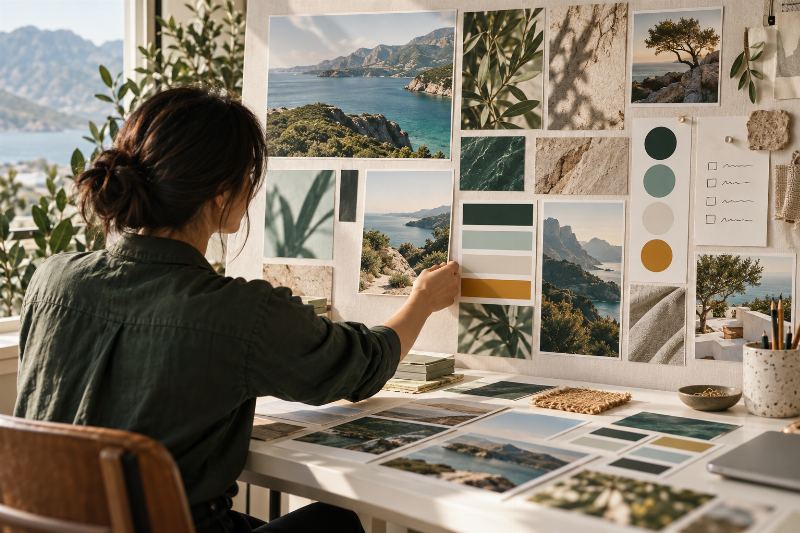

Midjourney for Marketing Moodboards: A Practical Workflow
A moodboard is a decision tool, not a finished brand identity. It helps a team align on color, atmosphere, composition, texture, and image direction before spending time on final campaign assets. Midjourney can help explore visual concepts, but the marketer or designer still needs to curate a coherent direction, check rights, and make sure the final work accurately represents the real product or service.
Midjourney's official Getting Started Guide is the place to check current prompting steps and interface details. Before using generated work in a client or commercial context, read the current Midjourney Terms of Service. This article is a workflow guide, not a statement about current plan features, prices, or legal rights.
Illustrative example: the process below uses a fictional travel company exploring a visual direction. It is not a real brand project or a claim about campaign performance.
What a marketing moodboard should decide
A useful board makes a few creative choices visible so stakeholders can respond to them. It might clarify:
- Atmosphere: calm, adventurous, precise, playful, premium, or another defined quality.
- Color relationships: dominant, supporting, and accent colors, including how they appear on different backgrounds.
- Composition: close-up versus wide scene, subject placement, negative space, and visual balance.
- Materials and texture: paper, fabric, landscape, product surface, lighting, or photographic treatment.
- Image role: hero photography, social campaign, product detail, editorial illustration, or supporting texture.
It should not pretend to settle the logo, final typography, packaging, product truth, or campaign copy. Those need the correct assets, design judgment, and approval.
Prepare a clear creative brief
Before generating concepts, write one short brief that specifies:
- The audience and the feeling the visual direction should create.
- The brand's approved colors, values, and visual boundaries.
- The intended use and where the final image might appear.
- Elements that must remain accurate, such as an actual product, location, or packaging.
- What must not appear: invented logos, readable text, false claims, competitor marks, or unapproved people.
- How the team will choose between concepts, such as legibility, relevance, originality, and consistency.
Separate essential constraints from preferences. “Use the exact approved product photo” is a constraint; “try a warmer light” is an exploration direction. If the brief has no audience or use case, pause and clarify before generating a large batch.
Step-by-step moodboard workflow
- Choose one visual question. Examples include “Should this campaign feel outdoorsy or refined?” or “Which color system keeps the product prominent?” Do not ask one board to resolve every brand decision.
- Collect approved references. Use material the team has permission to share. Keep the client's current logo and product assets separate from concept generation unless the workflow and rights explicitly permit their use.
- Write a visual prompt in layers. Describe subject, setting, composition, lens or illustration treatment, light, palette, texture, mood, and intended use. Keep the prompt concrete rather than stacking unrelated style words.
- Explore a small number of routes. Make each route meaningfully different, such as natural editorial photography, graphic geometric illustration, or warm documentary imagery. Keep one route per board.
- Curate instead of collecting everything. Select a few images that reinforce the same direction. Remove attractive images that contradict the brief or add a different palette and visual language.
- Annotate the board. Label what each reference is meant to communicate: palette, lighting, composition, texture, or subject treatment. Mark any generated imagery as exploratory.
- Review for risks and accuracy. Check for malformed objects, strange details, accidental text, unintentional brand resemblance, misleading product appearance, and culturally insensitive or stereotyped imagery.
- Translate decisions into a production brief. Record the approved palette, image style, crop guidance, and what remains unresolved. Use real product photography and properly licensed assets for final factual representations.
- Get approval and version the board. Save the prompt, selected references, date, reviewer, and decision notes. A board without a decision record can be misread as final approval.
Worked example: a fictional travel brand
A fictional travel company wants to explore a moodboard for a new destination guide. Its audience is people comparing relaxed nature trips, and the intended asset is a social campaign that will eventually link to real destination details. The brief defines a calm, welcoming mood, a deep green and aqua palette, and ample space for approved campaign copy. It prohibits invented destination facts, fabricated logos, and images that could be mistaken for a confirmed hotel or itinerary.
The creative team explores three clearly labeled directions: a landscape-led editorial route, a close-up materials route, and a clean illustrative route. It reviews each for palette consistency, readable text placement, and whether the imagery could mislead a traveler about a real location. After selecting a direction, the designer creates the final layout with verified destination photography and approved copy rather than treating generated scenery as documentary evidence.
The output of this exercise is a documented visual direction, not a prediction about engagement, bookings, or sales. Those require a properly measured campaign after launch.
Reusable prompt template
Project: [brand or project, only if permitted]
Audience: [who should respond to the visual]
Use: [moodboard / concept exploration / campaign direction]
Visual question: [one decision this board should help make]
Subject: [what the image should show]
Composition: [viewpoint, focal point, spacing, and negative space]
Lighting and materials: [specific visual cues]
Palette: [approved colors and relative emphasis]
Mood: [a few precise adjectives]
Constraints: [what must stay accurate or must not appear]
Output review: [criteria stakeholders will use]

Create exploratory visual directions only. Do not add readable copy, logos, awards, product claims, real customer endorsements, or invented packaging. Do not imitate a named living artist or reproduce a competitor's identifiable campaign. Keep the concept aligned to the supplied brief and leave space for a designer to add approved brand assets later.
Use one prompt version for one visual question. When changing direction, record what changed—subject, palette, composition, or lighting—so reviewers can give useful feedback instead of choosing a favorite image without a reason.
From moodboard to usable campaign assets
Once a visual route is approved, turn it into concise production notes:
- Approved color roles and contrast combinations.
- Preferred subject scale, crop, and negative-space placement.
- Image treatments that fit the brand and treatments to avoid.
- Which real photographs, product renders, or illustrations must be used.
- Copy areas, legal disclosures, and CTA placement reserved for the designer.
- Placement sizes to verify against the current specifications of each social platform.
For the post-click customer journey and lead quality, see our Meta Ads lead troubleshooting guide. For research-based article planning, use our SEO content brief template. Both are complementary workflows; neither establishes the performance of a moodboard.
Limitations and common mistakes
- Visual polish can hide factual inaccuracy. A generated landscape may look real without depicting the actual destination. Label conceptual imagery and replace it with verified photography where truth matters.
- Consistency takes curation. A batch of attractive images may still disagree on lighting, materials, palette, or audience. Select for a system, not novelty.
- Generated text is unreliable for final copy. Add headlines, dates, prices, and disclosures in a design editor from approved text and proofread them.
- A prompt does not establish rights. Review the current terms and relevant law for the tool, territory, and intended use. Do not promise exclusivity without legal review.
- Style references can create risk. Avoid asking for a close imitation of another artist, brand, campaign, or distinctive protected character. Describe the visual qualities you need instead.
- More variations do not mean better decisions. Keep the exploration small enough to review carefully and tie each variation to a clear question.
For the final campaign, measure real results rather than using moodboard preference as a proxy. Our GA4 events and conversions guide describes a separate measurement process.
Privacy, copyright, and client approval
- Do not upload confidential client files, unpublished products, customer photos, personal data, or private campaign plans unless you have explicit permission and the applicable terms allow it.
- Review Midjourney's current Terms of Service and any applicable agreement before using outputs in a commercial deliverable. Requirements can change; do not rely on old screenshots or informal summaries.
- Use references you are allowed to use. A publicly visible image is not automatically free to copy, remix, or use in advertising.
- Do not create fake reviews, awards, endorsements, logos, or product details. Keep real claims and customer evidence tied to their approved source.
- Check for recognizable people, trademarks, and distinctive protected work in generated results. Remove or replace questionable material before delivery.
- Tell the client whether a board is exploratory, approved direction, or final production art. Record the approval and asset licenses.
Final verification checklist
- Does the board answer one defined visual question for a specific audience and use?
- Do the selected images form a coherent direction rather than a mixed collection?
- Are generated concepts clearly labeled and factual imagery verified?
- Have logo, product, copy, date, and offer details been added from approved sources?
- Have current platform crops and safe areas been checked for planned placements?
- Have Midjourney's current Terms of Service and asset permissions been reviewed?
- Are privacy, likeness, attribution, and client approval requirements satisfied?
- Is there a dated record of selected route, prompts, reviewer, and remaining decisions?
Frequently asked questions
Is a Midjourney moodboard a final brand identity?
No. It is a way to discuss visual direction. A designer still needs to develop final assets, check legibility and consistency, and use the approved logo, type, and imagery.
Can generated concepts be used in a client campaign?
Check the current Midjourney Terms of Service, your client agreement, applicable law, and any rights attached to reference assets. Do not assume the same answer for every output or use.
Should a moodboard include final copy?
It can show where copy might sit, but final wording should be added from approved text in the design stage. Proofread every claim, price, date, and disclosure.
How do I know which visual direction is best?
Compare each route against the brief: audience relevance, brand fit, product accuracy, accessibility, and production needs. If campaign performance matters, test actual approved creatives and measure real data.
Conclusion
Midjourney is most useful for marketing moodboards when it expands the team's visual options without replacing the brief, the designer, or the rights review. Explore a few distinct routes, curate them into a coherent system, annotate the decisions, and use accurate, approved assets for final campaign work. A thoughtful moodboard improves alignment; it does not guarantee campaign results.
Need help developing a visual direction for a campaign? Contact the MAS team with your audience, brand references, and intended placements.
Featured image: An art director curating a coherent visual moodboard from landscape, texture, and palette references.

