

 Bonani DOSH, Dhaka - 1230, Bangladesh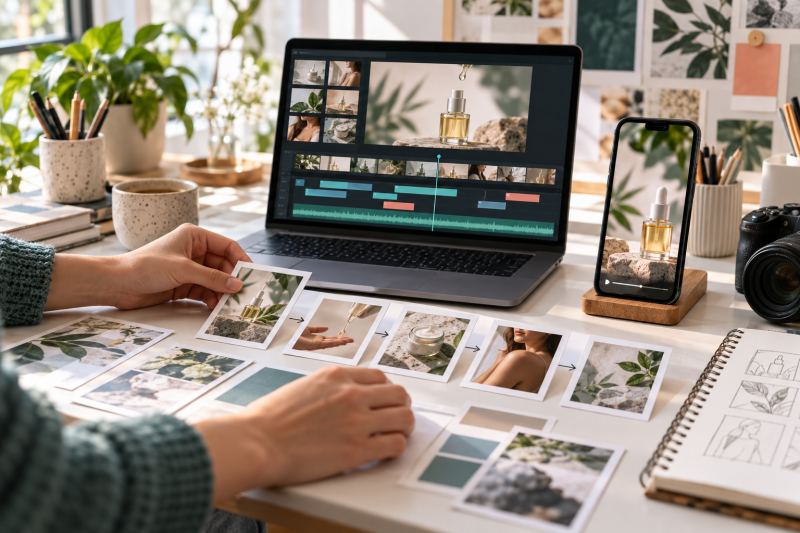

Runway for Short Marketing Videos: A Practical Workflow
Short-form video gives a small business a way to demonstrate a product, show a process, or set a mood in a few seconds. Runway can help explore moving-image concepts, but a generated clip is only one component of a campaign: the offer, factual claims, edit, captions, and final review still need human ownership.
Runway's current official help article for creating with Gen-4.5 describes text-to-video and image-to-video. Its Text to Video Prompting Guide recommends clear descriptions of what is in the frame and how it moves. Product options and availability can change, so check the live documentation and your account before production. This guide makes no claim about plan, price, or campaign performance.
Example note: the workflow below uses a fictional small-batch skincare business. It is an illustrative production exercise, not a client result or product claim.
Start with the job, not the effect
Write one sentence describing what the video should help a viewer understand. For example: “Show how a fictional glass skincare bottle is prepared for a gift order.” Then decide the audience, platform placement, approved message, and next step. A clear job keeps the work focused on communication rather than generating motion for its own sake.
Separate the video into two kinds of material:
- Factual elements: the real product, label, ingredients, price, offer terms, location, staff, customer quote, or certification. Use approved source material and copy for these.
- Exploratory elements: a background, lighting mood, abstract transition, illustrative scene, or non-factual visual metaphor. These can be explored with generated concepts where appropriate.
If the product must be represented accurately, do not ask a model to recreate its packaging from memory. Start from a product photograph you have permission to use and review every generated frame for changes.
A practical short-video workflow
- Collect the brief. Record the objective, audience, placement, aspect ratio required by that placement, approved product references, exact offer and CTA, and reviewer. Confirm the current delivery specifications on the destination platform.
- Write a tiny storyboard. Use three to five beats: opening visual, product or process, useful detail, and close. Each beat should express one action. Keep a separate column for any factual copy that must be added later.
- Choose the generation approach. Use text-to-video to explore a scene from a written direction. Where the current workflow supports it, image-to-video can introduce motion to an approved still. Consult Runway's current documentation for available inputs and controls.
- Describe visible action precisely. Name the subject, setting, movement, camera behavior, lighting, and visual style. Prefer one understandable action per clip. Avoid asking for essential text, prices, logos, or small label details to be generated inside the image.
- Generate a few purposeful options. Change one main variable at a time, such as camera movement or background. Keep notes on the prompt and chosen source image so the team can reproduce or reject a direction deliberately.
- Review the clips frame by frame. Check the product shape, label, hands, faces, reflections, continuity, and unexpected objects. Reject any frame that makes the product or a claim look different from the approved source.
- Assemble the final edit. Use a video editor to arrange the selected shots, add licensed music or approved audio, place the real logo and exact copy, create captions, and finish with a clear CTA. Keep important text inside platform-safe areas.
- Preview the actual export. Watch the whole file with sound and muted, inspect it on a phone-sized screen, confirm the crop and captions, and check that the destination URL or offer is correct.
- Publish and measure honestly. Use the campaign's real analytics to assess delivery and response. A creative draft is not evidence of reach, leads, sales, or return on ad spend.
Worked example: a fictional skincare product
A fictional skincare shop wants a short product-education video for a social placement. Its approved bottle photography and product description are available, but it has no footage of a studio setup. The team plans four beats: a calm opening scene, a close view of the real bottle, a short application or packing moment using approved footage, and a final frame containing the verified product name and CTA.
The marketer first sketches each beat and marks the bottle label and product details as “must remain exact.” They use a descriptive prompt to explore a botanical tabletop scene, then compare the output against the real pack shot. If the generated bottle changes shape or label, that frame is discarded. The designer places the authentic pack shot and approved brand assets into the edit, adds copy manually, and checks the final crop on mobile.
The team keeps the finished video focused on a demonstrable product detail. It does not add a health promise, customer testimonial, ingredient, or offer that was not in the approved brief. The exercise ends with a reviewed creative file; whether it performs well can only be learned from a properly configured campaign and real results.
Reusable prompt and storyboard template
Campaign purpose: [one clear communication job]
Audience: [who should understand this]
Placement: [platform and current aspect-ratio requirement]
Clip beat: [one action in this shot]
Subject and setting: [visible objects and environment]
Motion: [what changes during the shot]
Camera: [static, pan, push-in, handheld, or other direction]
Lighting and visual tone: [specific, concise direction]
Source image: [approved image, if used; record owner and permission]
Must stay accurate: [product, packaging, person, place, or fact]
Add later in edit: [logo, headline, price, captions, CTA]
Do not generate: [text, labels, claims, badges, trademarks, or extra objects]
Review for: [continuity, artifacts, accuracy, rights, crop, accessibility]

Create one visual concept for this storyboard beat. Show only the described action.
Do not invent product details, readable words, logos, endorsements, or results.
Keep the composition suitable for the stated placement and leave the specified
copy area clear. Treat the output as a draft for human review.
For a sequence, make a separate prompt for each beat and keep the subject, lighting, and visual direction consistent. The exact controls available depend on the current Runway workflow. Its Introduction to Prompting explains how to make creative direction specific and iterate deliberately.
Build a usable campaign package
- One main edit: the approved sequence with captions, sound, brand assets, and CTA.
- Placement versions: only the crops or lengths required for the planned channels; review each independently.
- Caption file or transcript: proofread for accuracy and accessibility.
- Static fallback: a still image or poster frame in case video playback is unavailable.
- Production record: brief, source assets, prompts, generated drafts, editor, approvals, export settings, and publication date.
For planning a related set of social-ad visuals, see our Canva Magic Studio workflow. To understand what happens after people click an ad, use the measurement steps in our GA4 events and conversions guide and our Meta Ads lead troubleshooting checklist.
Limitations to plan around
- Motion can introduce visual drift. Objects, labels, hands, faces, and backgrounds may change between frames. Review the full clip, not just its thumbnail.
- Generated copy is not dependable production copy. Add names, prices, dates, disclaimers, and CTAs manually from approved sources.
- A prompt is direction, not a guarantee. Iterate and reject unsuitable outputs; do not build a schedule that assumes the first generation will be usable.
- One clip rarely tells the entire story. A short video still needs a clear opening, a coherent sequence, and a legible next step.
- Technical settings can change. Confirm current input types, output options, account access, and destination-platform specifications in official documentation before committing a delivery.
- Creative quality is not campaign evidence. A polished edit does not prove that the audience understood it or that it generated business outcomes.
Privacy, copyright, and brand safety
- Upload only images, footage, audio, and reference material you have permission to use in the service and in the final campaign.
- Do not submit customer footage, personal information, unreleased client plans, or confidential product designs without explicit authorization and a review of the applicable service terms.
- Use licensed audio and check the rights for each channel and territory. A track available in one platform's library may not be cleared for every use.
- Do not imitate a specific living creator's distinctive style or reproduce a competitor's recognizable campaign. Describe the visual qualities you need in original terms.
- Check every frame for trademarks, unintended people, inaccurate packaging, false endorsements, and unsupported claims.
- Review Runway's current terms and the relevant laws and client agreement. Do not assume that a generated output is exclusive, automatically cleared, or suitable for every commercial use.
Final review checklist
- Does the opening make the subject and purpose clear without relying on sound?
- Does each shot support the storyboard, and does the sequence make sense?
- Are the product, package, people, locations, claims, and offer details accurate?
- Are logos, text, captions, and disclosures added from approved source files?
- Have artifacts, flicker, continuity changes, and misleading details been checked throughout?
- Are the crop, captions, contrast, and CTA readable on a mobile screen?
- Are source materials, audio, and generated assets permitted for the intended use?
- Are approvals, prompt notes, export versions, and measurement links recorded?
Frequently asked questions
Can Runway make a finished social campaign by itself?
Use it as a creation step, not as the entire campaign process. A human still needs to own the brief, factual copy, edit, accessibility, rights review, publishing, and measurement.
Should I use text-to-video or image-to-video?
Choose based on the starting point and the current controls available in your account. Runway's current Gen-4.5 guidance describes both approaches. Use an image only when you have permission to process it, and inspect the result for changes to important details.
Can I put my product label or price in the prompt?
Do not rely on generated lettering for exact information. Add the approved label, price, offer terms, and CTA in an editor, then proofread the export.
How do I know whether the video worked?
Define the intended outcome before publishing and use real platform and website analytics. Report only metrics you actually collected; do not infer sales from views or impressions.
Conclusion
Runway can be useful for exploring short-video scenes when the brief, storyboard, and review process are clear. Keep factual product details anchored to approved sources, direct each clip with specific visual actions, and treat every generation as a draft. A careful edit, rights review, mobile preview, and real measurement turn that draft into a responsible marketing asset.
Need help planning a small-business content workflow? Talk to the MAS team about your audience, source assets, and publishing goals.
Featured image: A marketer planning a short product-video sequence with a storyboard, phone preview, and editing timeline.

